Settings
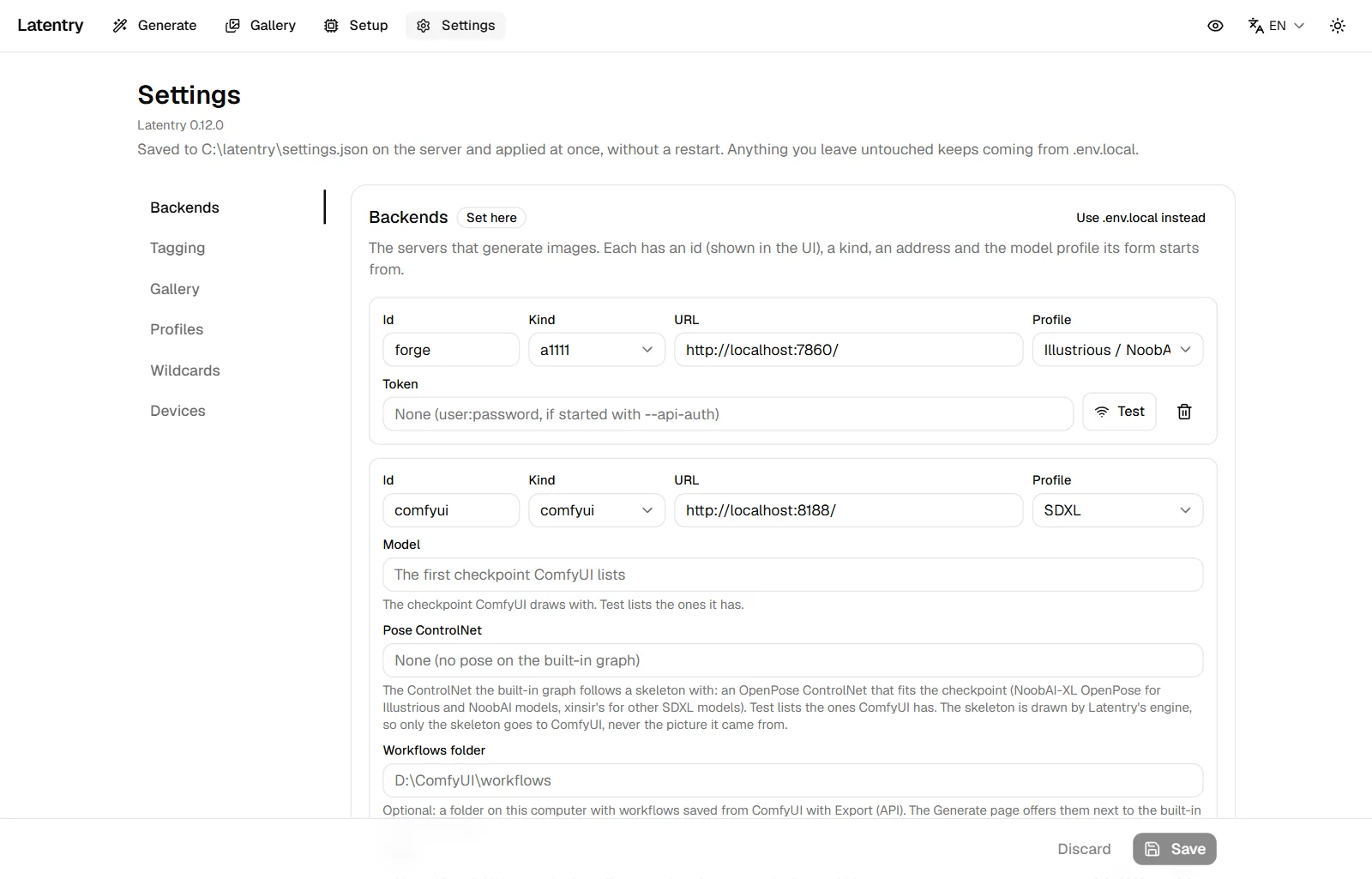
Everything here is saved to latentry.settings.json on the server and
applies at once, without a restart. What you leave untouched keeps coming
from .env.local; a section's badge says which it uses ("Set here" or
"From .env.local"), and Use .env.local instead goes back.
The list on the left (above, on a phone) shows one section at a time:
Backends, Tagging, Gallery, Profiles, Model info,
Wildcards and Devices. A dot marks a section with unsaved changes, a red one a section
with a field to fix. Save at the bottom saves every section at once. A
link can open a section, for example /settings#gallery; without one, the
page opens at the section you chose last in this browser.
By default, settings can only be changed on the computer running Latentry
(opened as http://localhost); see Other devices and security.
Backends
The servers that generate images. Each has:
- Id: what the UI calls it (a–z, 0–9,
-,_). - Kind:
diffusers(a server speaking the backend API),a1111(AUTOMATIC1111 / Forge with--api) orcomfyui(a ComfyUI server; see Backends). - URL: where it listens.
- Profile: the model profile its form starts from.
- Model (
comfyuionly): the checkpoint ComfyUI draws with. Test fills the list with the ones it has; left empty, it is the first. - Pose ControlNet (
comfyuionly, optional): the ControlNet the built-in graph follows a skeleton pose with: an OpenPose ControlNet that fits the checkpoint (see Backends for which one). Test fills the list; left empty, the backend offers no pose. - Workflows folder (
comfyuionly, optional): a folder of workflows saved with ComfyUI's Export (API), offered on the Generate page (see Backends). Show workflow names on paired devices lets paired phones see and use them; it is off by default. - Token: a Bearer token for
diffusersandcomfyui(for a proxy in front of it),user:passwordfora1111started with--api-auth. Saved tokens are never shown again; type to replace one. A token is only sent to the server it was saved for: changing the URL to another host, port or scheme asks for the token again. AGEN_TOKEN_<ID>from.env.locallikewise applies only whileGEN_BACKENDSlists that id at the same address.
Test checks the address and shows the loaded model. Latentry's own engine is not listed here; it comes from Setup.
WD14 tagging
What reads tags (tag extraction, gallery tags, bulk tagging): Tag with
the built-in model (Latentry runs it on the CPU) or a backend that has a
tagger. The built-in model needs a folder with model.onnx and
selected_tags.csv from a SmilingWolf WD tagger, which Setup can download.
General threshold and Character threshold set how sure a tag must be.
Gallery folders
- Save folder: every finished picture is saved here with its settings; created if missing. Empty: pictures are not saved (download them one by one).
- Other folders (read-only): other tools' output to browse. Latentry never writes to these. Add folder adds one.
- Display name, next to each folder: what the gallery's tabs and other devices call it (up to 40 characters). Left empty, the folder gets a made-up name such as "Amber Fox" that stays the same.
- Tag every saved image with WD14 as it arrives.
- Write LoRA hashes into saved images (off by default). A picture made with LoRAs on Latentry's engine then carries A1111's "Lora hashes", which sites such as Civitai use to link the LoRAs. A hash identifies the exact file on this computer, so anyone you share the picture with can tell which files you have. Off, the picture still names the LoRAs and their weights.
The browser never sees these paths or the folders' own names; it only knows folders by number and display name.
Model profile defaults
What a form starts from for each model family: width, height, steps, CFG,
negative prompt, quality tags and artist notation ({artist} stands for the
name, for example by {artist}; - hides the artist field). Empty boxes use
the built-in value shown in grey. Changes apply to new forms, a profile switch
and a form reset.
Tag spelling and Never respell take effect on the next generation:
- Tag spelling is how the family writes the words in a tag: underscores
(
long_hair; built in for SDXL, Illustrious / NoobAI and Pony), spaces (long hair; Anima) or as typed (generic). - Never respell lists the tags that are always left exactly as written,
comma-separated.
*matches anything, soscore_*(the built-in value) coversscore_9andscore_8_up.-keeps nothing.
Save keeps the changes; Discard drops them.
Model info
Every checkpoint you have kept model info for, by file name, with its recommended settings and link. Edit opens the same editor as the generate page, where Delete removes it.
Add info for a model takes a file name, for example
model.safetensors (the list suggests the engine's models and the ones the
backends have loaded), so you can note a model's settings without loading
it. Applying them is done on the generate page.
This section saves each change at once; the Save button at the bottom is not needed for it.
Wildcards
Wildcards folder is an existing folder of .txt files, one choice per
line, for __name__ in a prompt (see Wildcards).
Subfolders work as __folder/name__, up to 3 deep. Lines starting with #
and blank lines are skipped, and a file over 1 MB is not read. Latentry only
reads the folder. Leave it empty for no wildcards.
Use on paired devices is off by default. While it is off, the picker and wildcards are on this computer only. On, paired phones and computers can list the wildcards' names and use them, so they see your file names and the lines that end up in their prompts.
Phones and other computers
The pairing card: whether Latentry listens on this computer only or is open to your network, Add a device for a one-time code, the paired devices with Remove, and Forget all devices. See Other devices and security.