Pose and the 3D view
Skeleton pose makes the run follow a pose taken from any picture, even a group picture: the backend finds the people in it, you pick which of them to follow, turn their pose in 3D and frame it if you like, and the run is drawn along that skeleton. It needs a backend that offers pose control: the built-in engine (SDXL models and Anima v1.0), a ComfyUI backend while the engine runs, with a Pose ControlNet or a workflow of your own (see Backends), or a server that implements it (see the backend API).
Take a pose from a picture
Drop a picture on Skeleton pose, choose one From gallery, use Use the source's pose when a source image is set, or Use as pose reference in the gallery viewer. The skeleton the run will follow appears at once, drawn for the output's size.
Pose strength is how closely it is followed: 1.0 is what the pose model was trained at; higher follows more closely but can cost quality. Busy or dynamic poses (running, jumping) are followed least reliably.
Choose whose pose
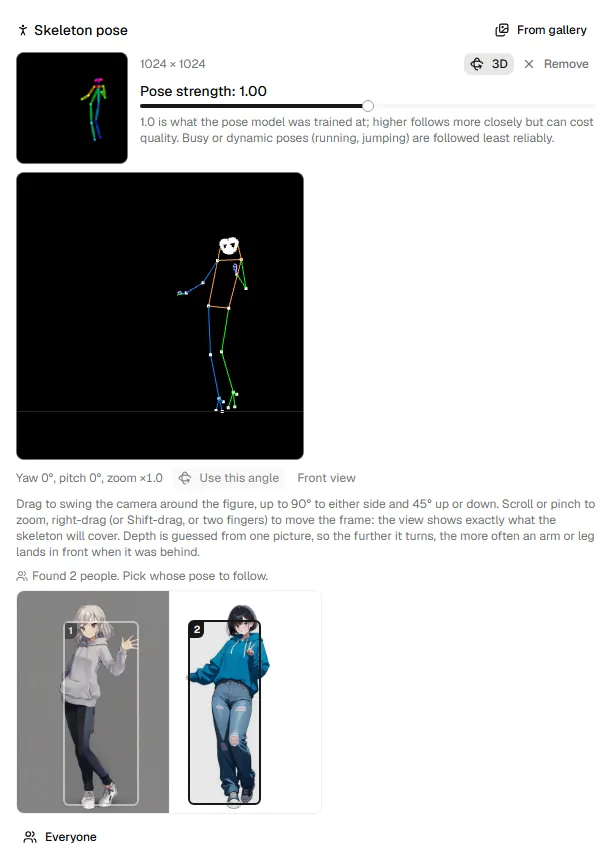
With several people in the picture, their boxes are drawn over it, numbered
left to right. Click a box to follow that person or leave them out, so two
of three can be used; at least one stays. Everyone picks the whole
group. A backend that takes only one person or everyone (one without
person_subsets, see the backend API) offers just
that, and the chooser says why; Latentry's engine takes any set from
poseorbit 0.2.0 (run Repair / update on Setup once). The
run sends only the skeleton, so the people's looks do not carry over.
Turn it and frame it in 3D
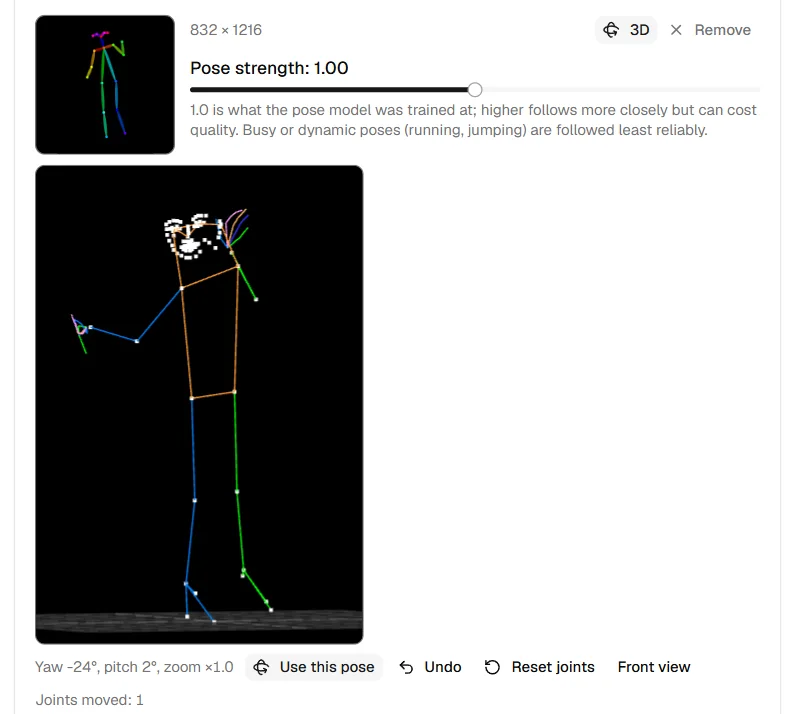
Press 3D to open the 3D view. It has the output's shape and shows exactly what the skeleton will cover.
| To | Do |
|---|---|
| Swing the camera around the figure | Drag (up to 90° to either side, 45° up or down) |
| Zoom in or out | Scroll, or pinch (×0.5 to ×6) |
| Move the frame | Right-drag, Shift-drag, or drag with two fingers |
| Move a joint | Drag the joint (see below) |
| Take back the last move | Undo: a joint, a turn, a zoom or a move of the frame, one at a time |
The angle and zoom show under the view. Press Use this pose to have the skeleton drawn from there; Front view goes back. The skeleton's thumbnail then says "Seen from yaw …".
Zooming in turns a full-body reference into an upper-body or face close-up; zooming out leaves room around the figure.
Things to know
- Depth is guessed from one picture, so the further it turns, the more often an arm or leg lands in front when it was behind.
- Some models draw a strongly turned figure from behind. Turn away from the side the figure already shows, keep the turn moderate, and put "front view" in the prompt and "from behind" in the negative.
- With an SDXL model, the skeleton is body only. In a close-up a warning says how few body joints are left in the frame: the model has little to follow.
- If you change the output size after drawing a skeleton, it is fitted inside; Detect again lines it up.
Move a joint
Drag the head, a shoulder, elbow, wrist, knee, ankle or a foot point in the 3D view. It turns about the joint it hangs from, and everything below it comes along: drag an elbow and the forearm and hand follow. No bone changes length, so a joint swings around rather than stretching.
- The joint moves across the screen. To move it toward or away from you, swing the camera to the side and drag it again.
- A hand keeps its shape and moves with its wrist; the face moves with the head. Fingers do not move one by one.
- The hips stay where they are. To turn the whole figure, swing the camera.
- Moving a shoulder does not move the head.
- Undo takes back the last move, whether of a joint or of the camera, in the order they were made; Reset joints puts all the joints back and leaves the camera. "Joints moved: N" shows under the view. Press Use this pose to draw the skeleton with them.
- The moves stay with the picture: picking other people or another angle keeps them, and a new picture starts as detected. They are held only in the page, never saved.
Moving joints needs poseorbit 0.3.1 in Latentry's engine (run Repair /
update on Setup once). On a backend that cannot, the view
says so (see movable in the backend API).
The detection, 3D turn and drawing are poseorbit, which can also be used on its own.
When pose or the 3D view does not show
If a backend cannot use a feature, the form says so in a folded line, Not available on this backend: …. Open it to see why and what would turn the feature on:
- The server says: … comes from the backend itself. The built-in engine uses it to say, for example, that an Anima model with 40 layers cannot follow a pose and a 28-layer v1.0 one can.
- /api/health does not say "pose_control": true means a server you run
yourself has not announced pose. It needs
pose_control: truein/api/health,POST /api/pose, and thepose_*fields on/api/generate(see POST /api/pose). - An A1111 web UI cannot follow a skeleton through Latentry. Use the built-in engine or a diffusers-compatible server.
When the pose works but the 3D button does not appear, a note under the
skeleton says so. The backend's /api/pose needs to take want_3d and
camera and answer with limits, plus limits.zoom for zooming (see
Turning the pose).
If you switch to a backend without pose while a skeleton is set, a warning says the skeleton is left out of the run.