Bigger pictures
Two ways to get a larger picture with real detail instead of a stretched one: hires fix for a new picture, Upscale for one already in the gallery.
Hires fix
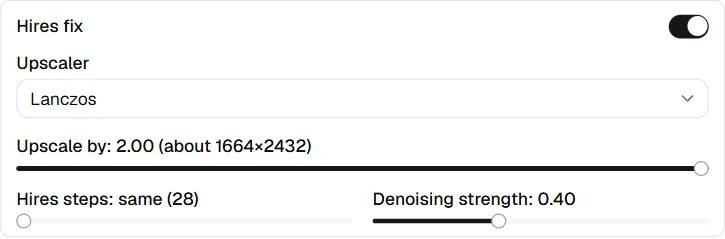
Hires fix draws each picture at the size above, upscales it, and redraws it at the larger size, so the detail is drawn at full resolution instead of stretched. It is off until you switch it on, and takes longer: the progress bar counts both passes.
- Upscaler: how the picture is enlarged before it is redrawn. Lanczos
works everywhere and needs nothing extra. An A1111 or Forge web UI also
offers its own upscalers (R-ESRGAN and the like) and its latent modes;
ComfyUI offers the upscale models in its
models/upscale_modelsfolder, listed by file name. Latentry's engine has Lanczos only. - Upscale by: how much larger, with the size it ends at.
- Hires steps: the steps of the second pass. At 0 it runs as many as the first.
- Denoising strength: how much the second pass may change. Around 0.3–0.5 adds detail and keeps the picture; higher values redraw more.
It applies to pictures drawn from the prompt, with or without a skeleton pose. With a source image the run is img2img, so the section is hidden, and a ComfyUI workflow from the folder keeps its own passes. Backends that cannot do it say so under Not available on this backend.
The saved picture records the first pass's size with its hires settings, as A1111 does. Generate with these settings in the gallery turns hires fix back on with them, on the same backend.
Upscale a picture
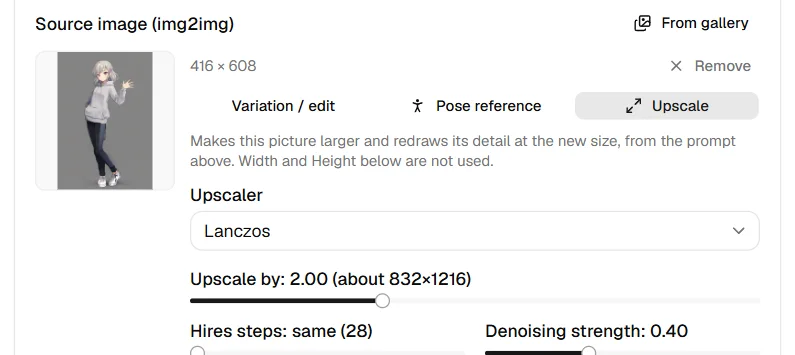
To give a finished picture the same treatment, choose Upscale in the gallery's side panel, or set the picture as the source and pick Upscale under What the source is for. The picture's own prompts come along when it has them; otherwise use the ones in the form. The same knobs as hires fix appear in the source slot: Upscaler, Upscale by (from the picture's own size, up to 4096 pixels a side), Hires steps (at 0, the form's Steps) and Denoising strength. Width and Height are not used.
- An A1111 or Forge web UI enlarges the picture in its Extras tab with the chosen upscaler, then redraws it with img2img. Its latent modes are not offered here.
- ComfyUI loads the picture at its own size and enlarges it in the graph.
- Latentry's engine enlarges it with Lanczos and redraws it with SDXL or Anima, one picture at a time.
- The saved picture records the size it had before, its hires settings and
the mode
upscale. - A picture larger than 2048 pixels a side is shrunk to that when it is loaded as a source.