Setup and the engine
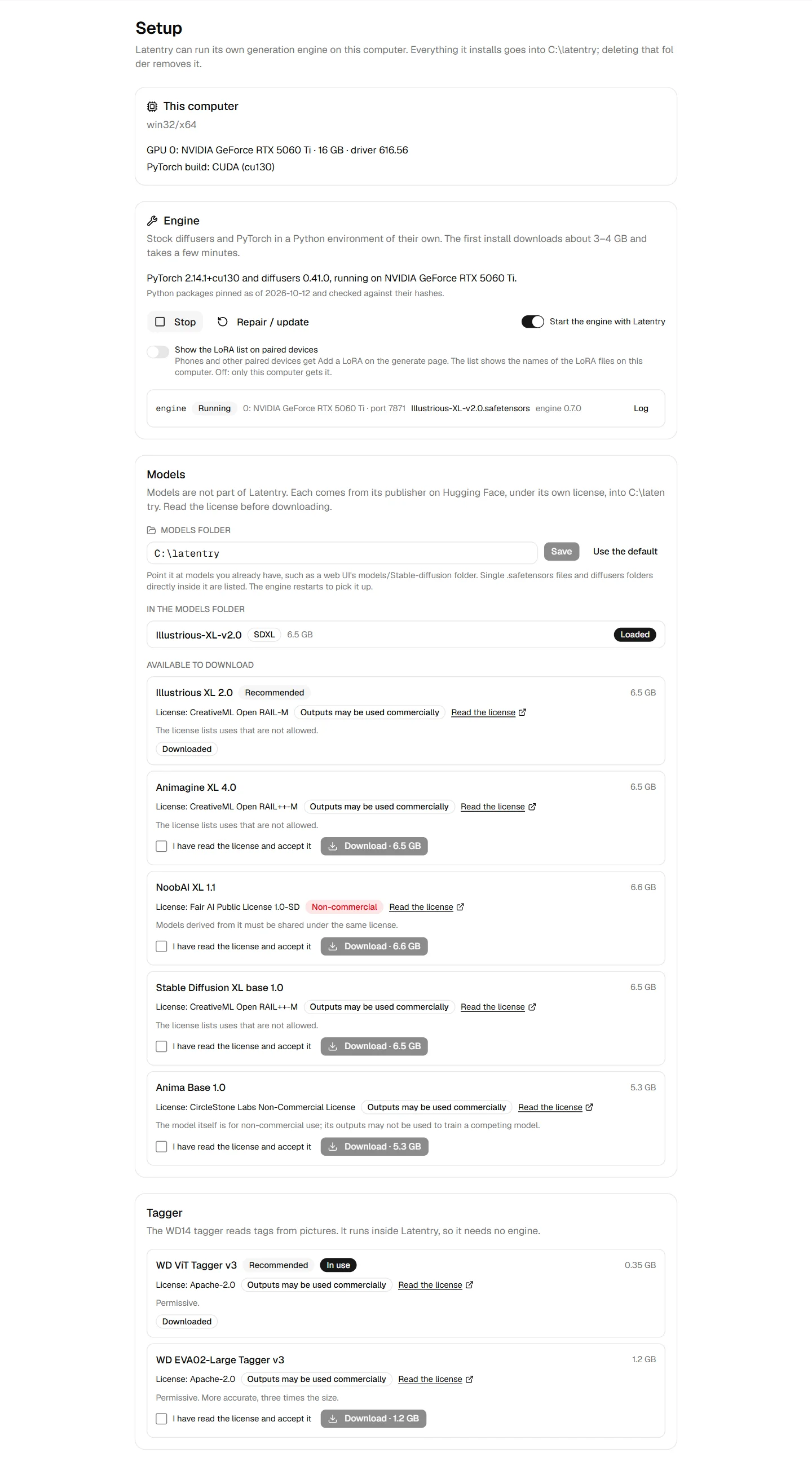
Latentry can run its own generation engine: stock diffusers and PyTorch in a Python environment of their own. The Setup page installs and runs it. Setup can only be changed from the computer Latentry runs on.
This computer
The GPUs found (name, memory, driver) and the PyTorch build that will be installed for them: CUDA 13.0, 12.8 or 12.6 by driver, Apple Metal, or CPU. Without an NVIDIA GPU the engine runs on the CPU, which takes minutes per picture.
Engine
- Install the engine: gets uv, Python 3.12, PyTorch (the large part),
diffusers and the engine, then checks the GPU from Python. About 3–4 GB,
a few minutes. Everything goes into
.runtime/, Python included: the engine does not use a Python or uv you installed yourself, and ignores your own uv settings (UV_*variables,uv.toml). Deleting.runtime/removes the engine. An engine installed before this used a Python 3.12 from this computer when it found one; Repair / update moves it onto its own. uv is a fixed release, checked against its published SHA-256 before it is run. - Repair / update: run it after updating Latentry, or when the engine will not start.
- Start / Stop, and Start the engine with Latentry. One engine runs per NVIDIA GPU, each with its port, state, loaded model, version and Log. An engine still running a version other than the one in Latentry's folder was started before an update; Setup says so, and a stop and start runs the new one.
- Show the LoRA list on paired devices (off by default): phones and other paired devices get Add a LoRA on the Generate page too. The list shows the names of the LoRA files on this computer.
The engine decides once at start how to use the GPU, from the memory that is free then:
| Free VRAM | Batch | Offload |
|---|---|---|
| 11.5 GB and up | 2–8 images at once | none |
| 7–11.5 GB | 1 | model offload to RAM |
| below 7 GB | 1 | sequential offload |
When it runs out of memory, it halves the batch and tries again.
With hires fix on, the engine draws one picture at a time: the first pass, then the second at the larger size, before the next. It upscales with Lanczos only, so no upscale model is fetched or loaded. The second pass encodes and decodes the larger picture tile by tile, so it fits beside the model (and the pose ControlNet) on a 16 GB GPU. On Anima, hires fix and a skeleton pose do not go together yet; an SDXL model takes both. Upscale works the same way on a source picture: Lanczos to the larger size, then one tiled redraw.
Models
Models are not part of Latentry. Each comes from its publisher on Hugging Face, under its own licence, into the models folder:
- In the models folder: what is there now; Load one, or see which is
loaded. Single
.safetensorsfiles and diffusers folders are listed. The engine reads weights only from.safetensorsfiles, which cannot run code. A diffusers folder with a part whose weights are only in a pickle format (.bin,.ckpt,.pt) is refused when you load it, and the message names that part. A single-file SDXL checkpoint needs SDXL's config files (scheduler, text encoders, tokenizers, no weights); the engine fetches them once from a fixed commit, checks each against its SHA-256 and keeps them in the controls folder, so later loads need no network. - Available to download: the licence, whether outputs may be used commercially, and a box to accept the licence before Download. Each download is a fixed version of the repository, and its files are checked against their SHA-256 before they are kept, so a repository that changes later cannot change what you get. The engine does the downloading, so Download works once the engine is installed and running.
- Models folder: point it at models you already have, such as a web UI's
models/Stable-diffusionfolder.
The engine runs SDXL-family checkpoints (SDXL, Illustrious, NoobAI,
Animagine, Pony…) with txt2img, img2img, inpainting and pose, and Anima with
txt2img, img2img and pose (v1.0 models). The pose models download on first
use into models/controls/; Anima-Control-Pose is non-commercial, as Anima
itself is. What each backend can do
compares the two with the other backends.
Tagger
The WD14 tagger reads tags from pictures. It runs inside Latentry, on the CPU, so it needs no engine. Download one here and Use this one.