Generate
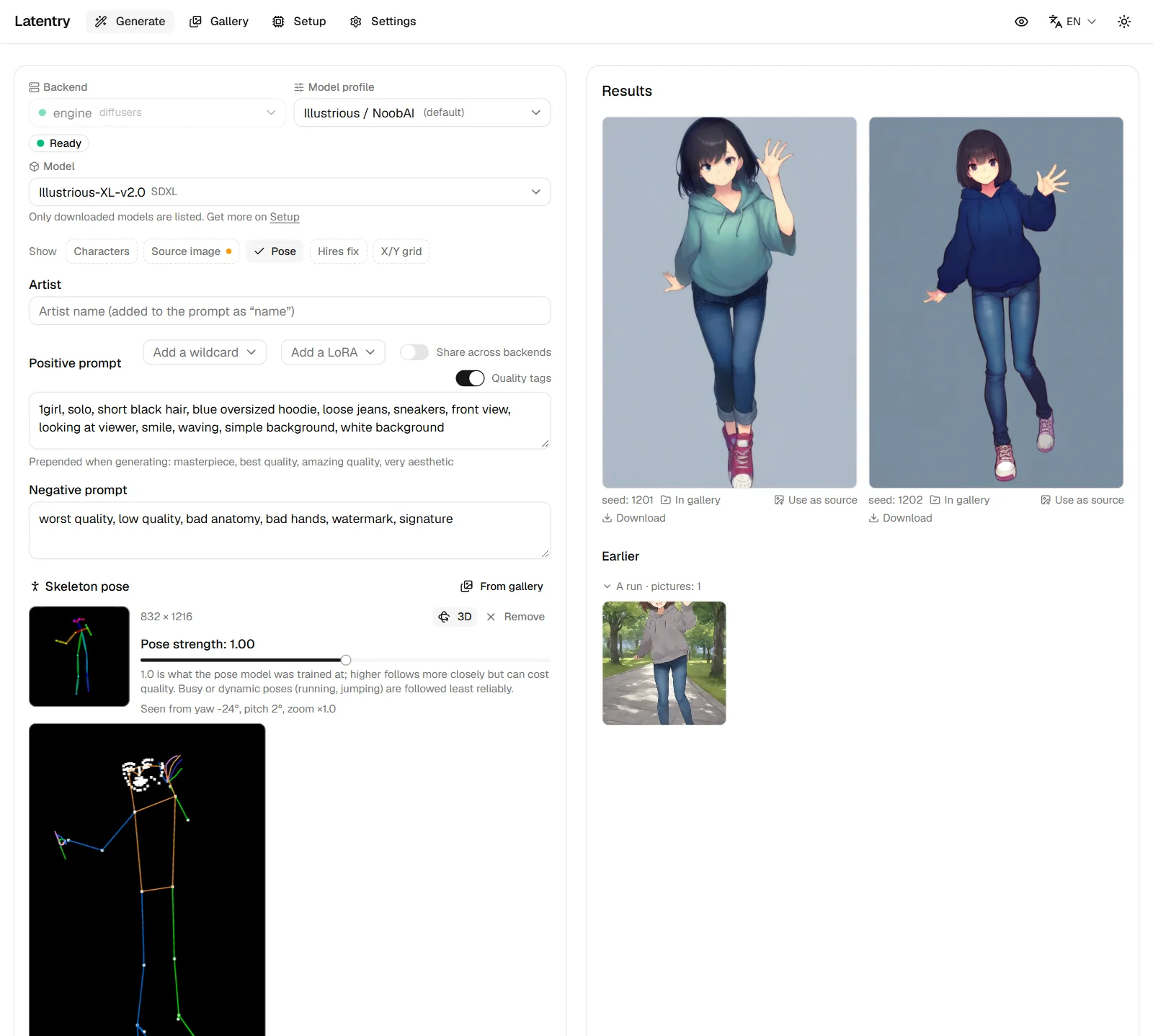
The form on the left, the results on the right. Each backend keeps its own form, so switching backends and back keeps what you typed.
Backend, profile and model
- Backend: where the picture is made. A dot shows whether it is ready, busy or offline.
- Model profile: the model family the form is set up for (Anima, SDXL, Illustrious / NoobAI, Pony, generic). It fills sizes, steps, CFG, negative prompt, quality tags and how an artist is written. Change it any time; defaults per profile are set on Settings.
- Model (built-in engine): which downloaded model the engine has loaded. Picking another loads it; get more on Setup.
- Workflow (a ComfyUI backend with a workflows folder): the built-in graph, or one of your own workflows. Under it, the page says what the workflow lacks (left as in the file). A workflow draws from the prompt only, so the source image is hidden while one is chosen. See Backends.

Model info
Under the model, Add model info keeps notes on the checkpoint: the link it came from, and the sampler, scheduler, steps, CFG, size, negative prompt and hires fix its page recommends. Use current values fills them in from the form. Once saved, a line under the model shows them, with the link. Every model's info, including models that are not loaded, is listed on Settings → Model info.
Apply recommended puts them on the form. Only what you saved is changed, and the prompt never is. A sampler or scheduler this backend does not offer is left as it was, and the page names it. Switching models never changes the form by itself.
Model info is kept by the checkpoint's file name, so the same file has the same info on the built-in engine, ComfyUI and AUTOMATIC1111 / Forge. A diffusers-compatible server does not name its file, so it has none.
It is saved in latentry.models.json, next to the settings file, and only
this computer and owner devices can see or change it.
Latentry never opens the link itself. Secret mode does not cover it, since
it is not part of what you type into a run.
Show only what you use
The Show row under the backend hides the parts of the form you do not need: Characters, Source image, Pose, Hires fix and X/Y grid (only those the backend can do are listed). A hidden part is not used: a source image, a skeleton, hires fix or a grid in it is not sent. What it holds is kept, and an amber dot on its button says so, until you show it again. Sending a picture to the form as a source (from the gallery or a result) shows Source image again.
Which parts are hidden is remembered in this browser only, and not while secret mode is on.
Prompts
- Artist: a name, added to the prompt the way the profile writes it
(for example
@nameorby name). - Positive prompt and Negative prompt.
- Share across backends: by default each backend's form remembers its own prompt. Turn this on and every backend shows the same prompt and artist, so switching backends keeps your words and only the settings change. Turn it off to get each backend's own prompt back. The negative prompt is always per backend, because what to avoid depends on the model.
- Quality tags: when on, the profile's quality tags (shown under the prompt) are put in front when generating.
- Tag spelling: write tags either way,
long_hairorlong hair. When you generate, both prompts are sent in the spelling the profile's model family was trained on. A prompt or tags sent from the gallery arrive in that spelling too. Score tags, face tags such as^_^, LoRA calls,BREAKand sentences and wildcards are left as written. Change this per profile on Settings. - LoRAs: call one in the prompt as
<lora:name:0.8>. An A1111 web UI, ComfyUI (which loads the file of that name from its LoRA list) and Latentry's engine apply it. For the engine, put the LoRA files in thelorasfolder inside the models folder; Add a LoRA next to the prompt lists them and puts the call in for you (a LoRA made for another model family is greyed out). Add a LoRA is on this computer only, unless Show the LoRA list on paired devices is on (Setup > Engine): the list is the names of your LoRA files. The engine refuses a run that calls a LoRA it does not have, instead of running without it. Other backends read the tag as plain words, and the prompt shows a note saying so. - Wildcards:
__name__takes one line from a file of that name each run; see Wildcards. - Saved characters: save the tags that make a character, together with the artist, negative prompt and seed, and apply them to any form later. In secret mode a new one is only kept until secret mode is turned off.
Source image
Drop a picture on Source image (img2img) to redraw it, paint over part of it, upscale it or grow its canvas. See From a picture.
Size, steps and the rest
- Size buttons (1024×1024, 832×1216…) and the Width / Height sliders; the arrows swap them. Some profiles want multiples of 16.
- Seed: -1 for random (the button sets it); a fixed seed repeats a picture. With several images, each takes the next seed.
- Steps, Image count (1 to 16 pictures in one run), Sampler, Scheduler and Guidance scale (CFG). Backends with speed presets show Speed preset instead of sampler and steps; Custom brings them back.
- A slider moved away from its default shows a small arrow at the end of its label: press it to put that one slider back to the profile's value.
- On a phone or tablet, a slider moves only when you drag its knob. A swipe that starts on its track scrolls the page, and a tap on the track leaves the value alone.
- Reset (the arrow next to Generate) puts this backend's form back to the profile's defaults.
- Hires fix draws the picture again at a larger size; see Bigger pictures. X/Y grid draws the run again for each value of a setting; see Many pictures.
Results
Progress shows overall and per image. Each finished picture has:
- In gallery (it was saved), Use as source, Download.
- Click it to view it full screen.
When a new run starts, the pictures on screen move down to Earlier, newest first, so a queue of runs piles up instead of each replacing the last. Each run folds and unfolds from its heading (hover it for the whole prompt), and the two most recent start open. The last 5 runs (32 pictures at most) are kept in this browser tab's memory only: going to the gallery and back keeps them, and a reload clears them. Every picture is in the gallery anyway.
In secret mode no prompt is shown in Waiting or Earlier, even for runs started before it was turned on, and an open earlier run stays blurred until Show these. A page that has been in secret mode does not keep its runs for the trip to the gallery and back, even after secret mode is turned off (see Secret mode).
Runs live on the server, so reloading the page, or opening it in another tab, picks up a run in progress. Cancel stops it.
While a run is going, Generate becomes Add to queue; see The queue.
Secret mode
The eye at the top right turns on secret mode: what you type is not kept in the browser, the gallery blurs pictures and hides prompts, and a run is shown only on the page that started it. Pictures are still saved to the gallery folder with their prompt. See Secret mode.